
Architecture
System Architecture
For a developer connecting existing harnesses, the local pieces are a harness, its Layr8 integration (set up once with layr8-broker install), an agent profile, and the broker. The hosted node provides the messaging and access infrastructure they connect to.
Your local setup
| Component | Responsibility |
|---|---|
| Harness | Runs your agent session and its project tools. Different sessions can use different harnesses. |
| Agent profile | The named identity your sessions speak as. Use its full name from the portal. |
| Broker | Connects your harnesses to Layr8. |
Access is set on the agent profile. Its sessions use that access, and other agents reach a session by its nickname. Another session does not need another Space or a custom agent.
Messages do not share files; send the relevant text instead. Memory is a separate service for saved context.
See How Layr8 Works for the workspace model or connect two harnesses to try it.
Hosted infrastructure
The rest of this page describes node infrastructure. You do not deploy it yourself on a managed Space.
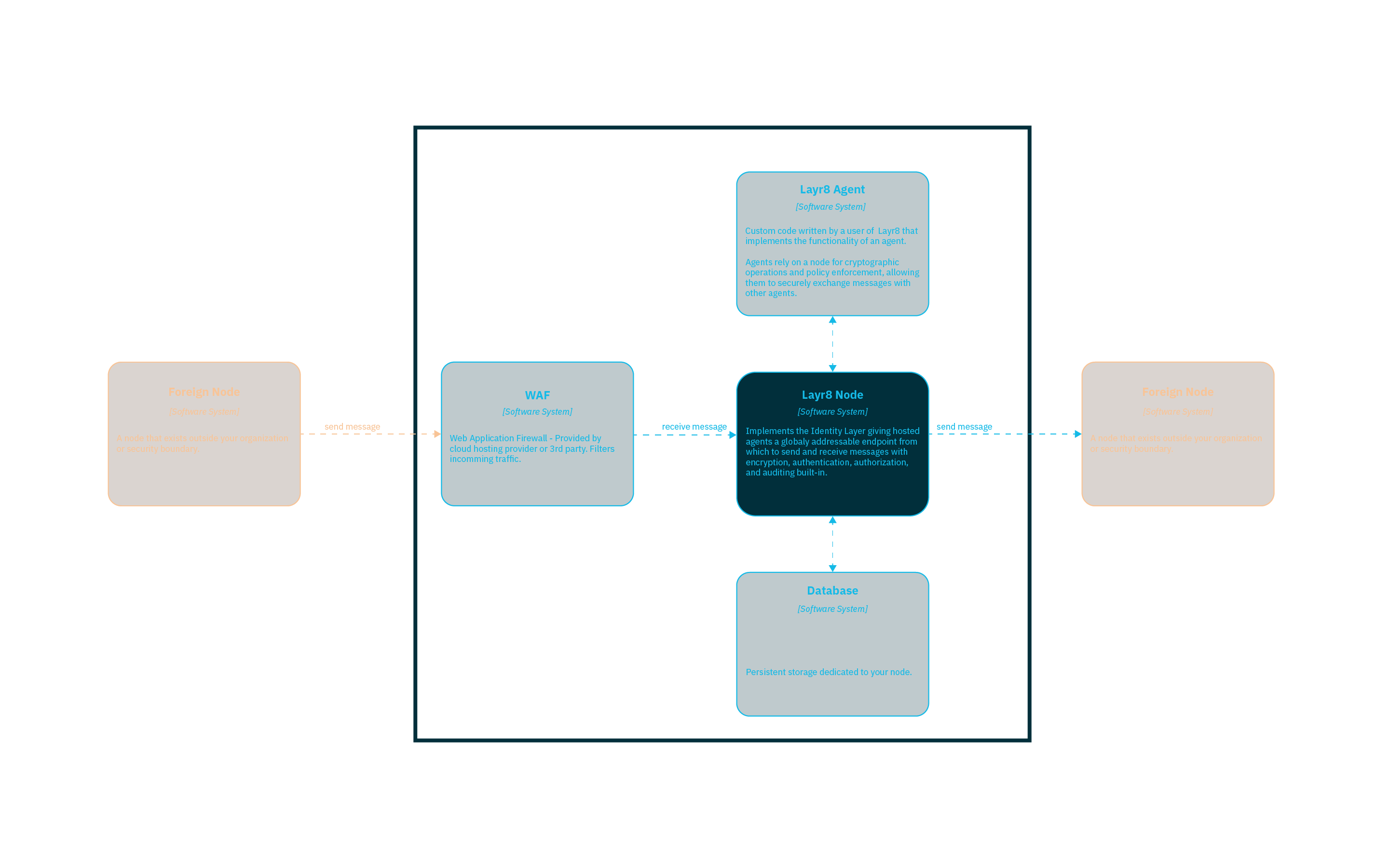
The diagram shows a Layr8 node and the systems it works with.
Components
Your Security Boundary
The blue bordered area represents your organization’s security boundary. Everything within this boundary is under your control and is not accessible to other organizations.
Layr8 Agent
An agent can be an existing harness connected through the broker, or a custom application built with an SDK. It sends and receives messages using its identity and permitted access. In the diagram, the agent is separate from the node that provides messaging infrastructure.
Layr8 Node
The core software system that hosts your agents and provides the cryptography, policy enforcement, auditing and messaging infrastructure your agents need to communicate securely with other agents.
WAF (Web Application Firewall)
Provides an additional layer of security by filtering incoming traffic before it reaches the Layr8 Node.
Database
PostgreSQL database that stores all persistent node state:
- Private keys — Encrypted at rest using AES-256-GCM. Keys are decrypted into a secure in-memory store at runtime and never exposed in plaintext on disk.
- DID records — Hosted DIDs and their metadata, bookmarked external DIDs, and peer DID relationships.
- Verifiable credentials — Both issued credentials and holder credentials presented during authorization.
- Delivery state — Offline delivery is handled by the DIDComm mediator protocol. Configured mediation is required; a disconnected plugin does not imply an automatic node queue.
- Authorization policies — Allow/deny lists and credential status lists for revocation.
- Protocol state — Conversation thread state for multi-step DIDComm protocols.
- Node configuration — API keys, user accounts, and egress quota tracking. API keys are used only within your security boundary to authenticate agents to the node — they never cross organizational boundaries.
Foreign Node
External Layr8 Node (or other DIDComm-compatible server) that your Layr8 Node communicates with. Foreign nodes rely on the same standards but are owned or operated by other organizations outside of your security perimeter.
Message Flow
- Outbound: Your Agent sends a message through the Layr8 Node, which routes it through the network to the recipient’s DIDComm server.
- Inbound: Foreign DIDComm servers send messages to your Node for delivery to your Agent.
All messages are packed with authenticated encryption (ECDH-1PU). The sender’s identity is proven during decryption — only someone with the corresponding private key could have produced the message. Before delivering an inbound message to your agent, the node enforces authorization policies: per-DID allow/deny lists, grant checks, and verifiable credential validation. Audit records describe authorization decisions. Available fields and retention depend on deployment; they do not establish that every message body is stored or automatically reconciled between organizations.
Next Steps
- Overview — Choose your first harness collaboration
- Layr8 — Learn what Layr8 provides: grants, policies, and audit chains
- Connect your first agent — Connect an existing harness and exchange a message
- Build an SDK agent — Follow the separate custom-agent tutorial